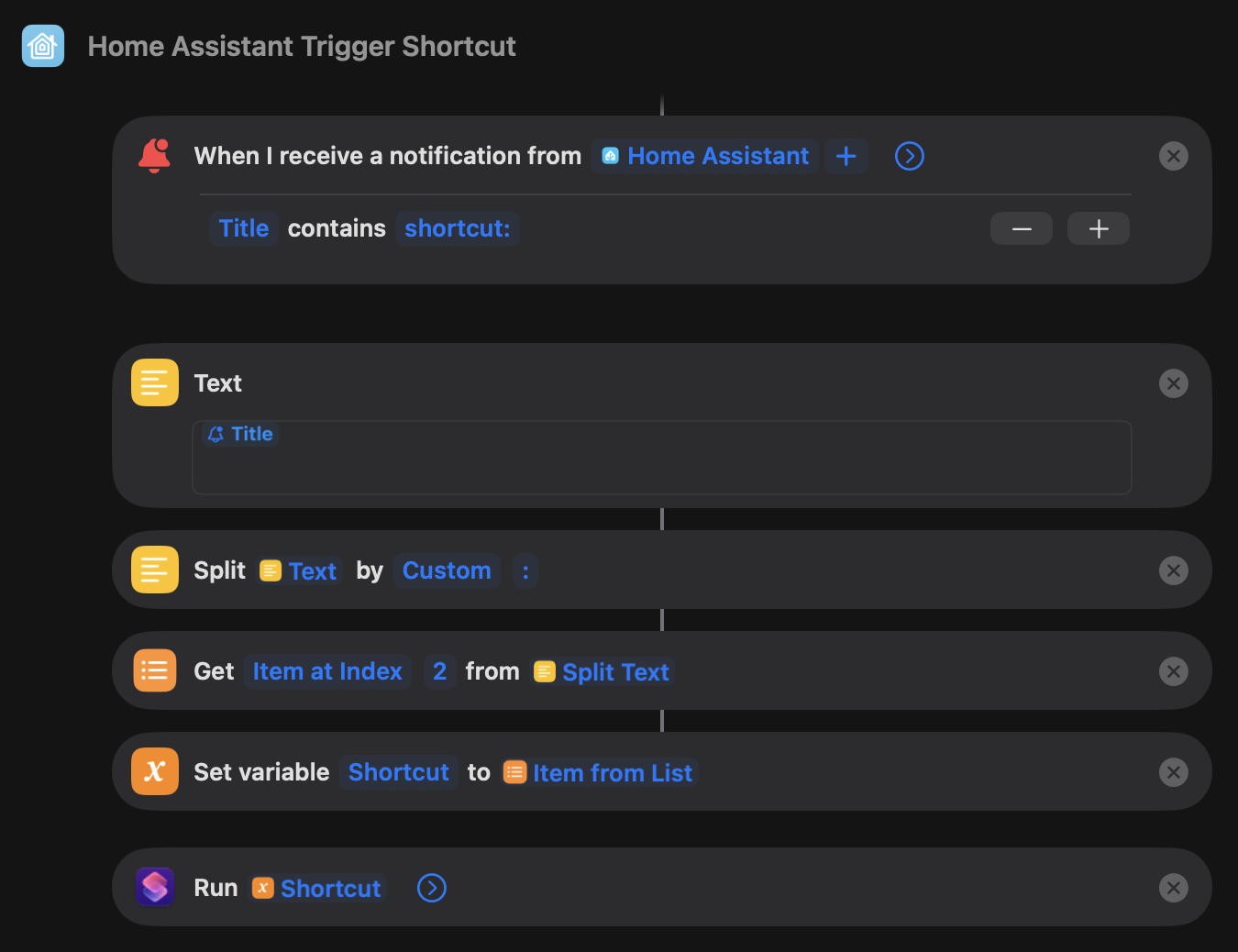
One of the most exciting additions to iOS 27 is the ability to trigger Apple Shortcuts automatically when your device receives a notification.
This means Home Assistant can now trigger actions on your iPhone, iPad or Mac, rather than just the other way around!
And to make things easier, I've created a downloadable Shortcut that handles the clever stuff for you.
Download my Home Assistant Trigger Shortcut
Install the Shortcut on the Apple device you want Home Assistant to control.
When setting it up, make sure you enable the Automation toggle, allowing it to run automatically when a matching notification arrives.
You won't need to build your own notification-processing Shortcut or configure complicated text filters. I've already done that for you!
Now all you need to do is send a notification from Home Assistant using a specific title format:
shortcut:Shortcut Name
Replace Shortcut Name with the name of the Apple Shortcut you want to execute.
For example, to run a Shortcut called Send Message, you could use the following Home Assistant action:
action: notify.mobile_app_your_iphone
data:
  title: "shortcut:Send Message"
  message: "Hello from Home Assistant!"
Simply replace notify.mobile_app_your_iphone with the notification service for your own device.
The notification title tells my Shortcut which Apple Shortcut to run, while the message body is passed into that Shortcut as input.
So, in this example, if your Send Message Shortcut is configured to send its input as an iMessage, Home Assistant has effectively triggered an iMessage!
Once you've tested that everything works, you can use the same notification format in any Home Assistant automation.
You could trigger Shortcuts to:
Send an iMessage when something happens at home.
Change your iPhone's Focus mode based on your presence sensors.
Run actions in apps that don't directly integrate with Home Assistant.
Pass information from Home Assistant sensors into other Shortcuts.
Trigger actions across multiple Apple devices.
You just need the Shortcut you want to execute to already exist on the receiving device, with its name matching the one in the notification title.
Some actions may require additional permissions or an unlocked device.
What makes this particularly powerful is that you're no longer limited to what Home Assistant can do directly.
Anything you can automate using Apple Shortcuts could potentially become something that Home Assistant can trigger!
And because the notification body gets passed into the Shortcut, you can even send dynamic information using Home Assistant templates.
It's a surprisingly simple addition to iOS 27, but one that opens up some HUGE possibilities for smart home enthusiasts.
Get my free Home Assistant Trigger Shortcut here
And if you come up with any particularly clever uses for it, let me know in the comments!
© 2026 Home Is Where The Smart Is. All rights reserved.